
Understanding Web Design Processes: A Client's Deep Dive Into Development
- 10 min read
- Last updated: August 7, 2026

Written by
Ethan Weston
Growth Marketer
Here is something nobody tells you before you hire a web designer. For most of the project, you will have no real idea what is happening behind the scenes. Designers use unfamiliar terms, send files you cannot open, and ask questions you are not sure how to answer, while weeks pass with nothing visible to show for it.
Then suddenly a design appears, and you are expected to have feedback ready on the spot. It feels confusing and frustrating, and none of it needs to be that way. Most designers struggle to explain their own process, not because they want to hide anything, but because they have done this work so long that they forget normal people do not speak their language.
This is exactly why we are putting the web design process explained in full, plain detail. Once you understand what happens at each stage, the entire experience changes. You know what to expect, when to expect it, and what your role is at every step, which means you catch problems early instead of discovering them once it is too late to fix cheaply.
WEB DESIGN WORKFLOW: WHAT TO EXPECT
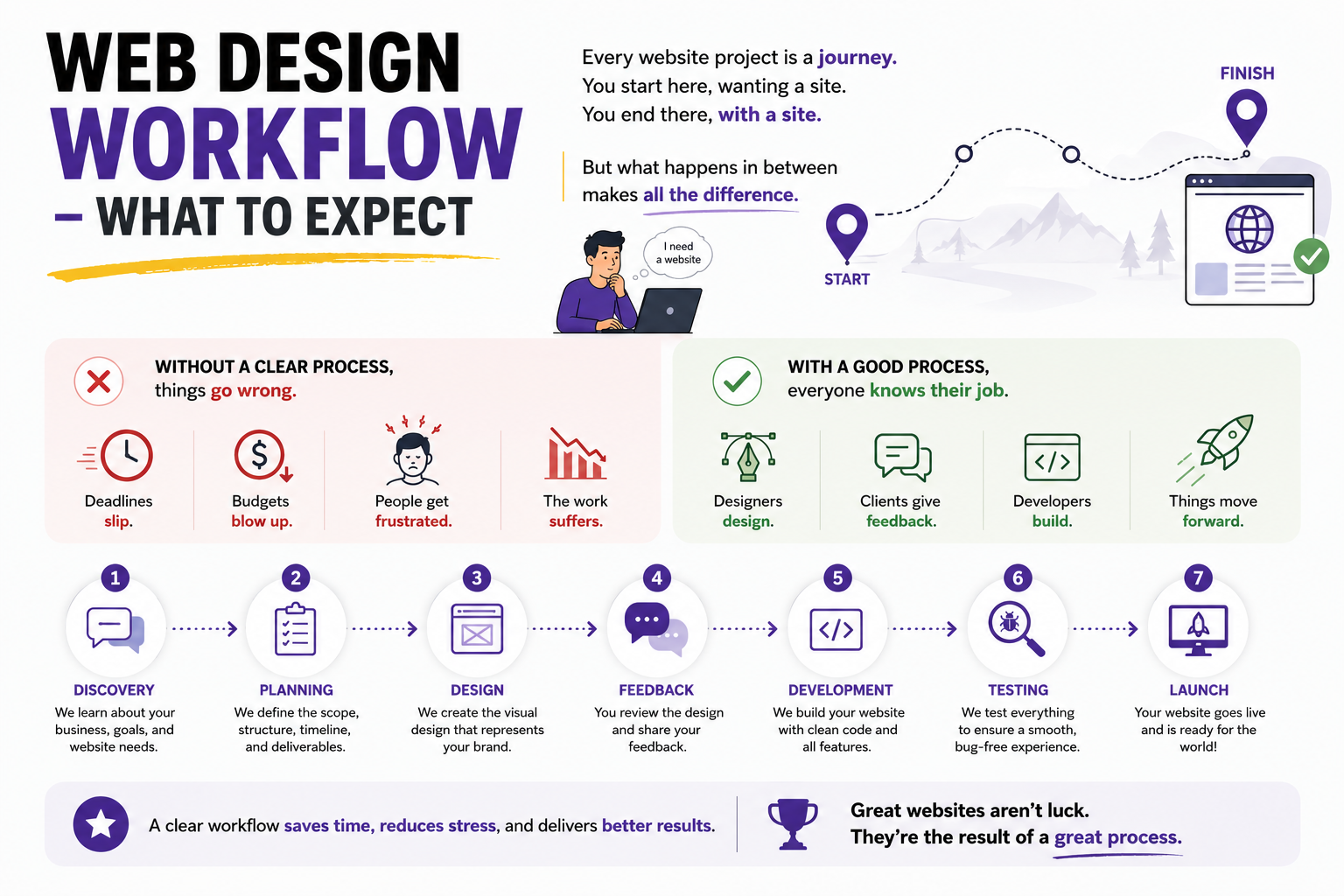
Every website project is a journey with a clear starting point and a clear destination, yet what happens between those two points determines whether the experience feels smooth or chaotic. Without a defined process, deadlines slip, budgets stretch thin, and everyone involved ends up frustrated with the result.
A reliable web design workflow protects everyone involved by making sure each person knows their job. Designers design, clients give feedback at the right moments, and developers build once everything has been approved, which keeps the whole project moving forward instead of stalling repeatedly. A solid process also catches mistakes while they are still cheap to fix, rather than after they have already been built into working code. With that foundation in place, here is exactly how the process is supposed to unfold from the very first conversation.
STAGE 1: DISCOVERY
Every strong website begins the same way, and it has nothing to do with design software. It begins with questions. This is the discovery phase, and a good designer's main job here is simply to listen.
What does your business actually do? Who are your customers, and what makes you different from competitors? What do you like about other sites you have seen, and what do you hate? Strong designers dig deep during this stage, aiming to understand your business almost as well as you understand it yourself.
You might fill out a questionnaire, join a long call, or share examples of sites you admire. None of this feels like building yet, but it is the single most important part of the entire process. Skipping the discovery phase is similar to building a house without ever asking how many bedrooms the family needs.
By the end of discovery, you and your designer should both have a clear, shared picture of what the site needs to accomplish, who it is built for, and what success will actually look like once it goes live.
STAGE 2: PLANNING
Once discovery wraps up, the designer takes everything learned and turns it into a concrete plan. This starts with a sitemap, which is simply a complete list of every page the site will include, from the homepage and about page through to services, contact, and anything else relevant.
The sitemap exists to make sure nothing gets forgotten along the way. You can look at it and immediately flag if an important page is missing before any design work begins.
Content planning follows right after. Someone needs to decide who is writing the text, which images are needed, and what files have to be gathered before design can move forward. This is the moment to start collecting your logo files, brand guidelines, and any existing photos or text you already have on hand. Strong planning at this stage prevents a frustrating situation later, where a page gets designed beautifully and then sits empty because nobody wrote the text for it.
STAGE 3: WIREFRAMING
This is where you start seeing something tangible for the first time. wireframing works like the blueprint of a house, with no paint and no furniture, just the bare structure showing where each element will sit and in what order.
Wireframes are usually simple black and white boxes and lines, showing roughly where the headline goes, where images will sit, and where buttons need to appear. This stage lets everyone focus purely on structure and flow without getting distracted by colors or fonts just yet.
Changes made at this point are fast and inexpensive. Adjusting a wireframe takes minutes, while adjusting a finished design takes hours, and adjusting working code takes days. This is exactly why it pays to study wireframes carefully rather than rushing past them toward something that looks more finished.
STAGE 4: DESIGN MOCKUPS
Design mockups take the approved wireframes and bring them to life visually. Colors appear, fonts get selected, and real images replace placeholder boxes, so the site finally starts to feel like an actual brand rather than a sketch.
REVIEWING MOCKUPS THE RIGHT WAY
Designers typically build mockups for key pages first, usually the homepage, the about page, and the contact page, before moving on to the rest of the site once those core pages are approved. This is the stage where your brand truly comes into focus, including the colors you selected and the tone the design carries.
Feedback matters enormously here, but it needs to be specific to be useful. Saying “I do not like it” gives a designer nothing to work with, while saying “can we make the headline bigger” or “this blue feels too bright” gives clear direction they can act on immediately.
Multiple rounds of feedback are completely normal during Design mockups, though at some point the project needs to move forward rather than chase endless small tweaks. Perfect can quietly become the enemy of finished if this stage drags on too long.
STAGE 5: STAKEHOLDER REVIEW
If other people in your organization need to sign off on the design, this is the moment for it. Stakeholder review means showing the approved mockups to everyone with a say, whether that is leadership, the marketing team, or anyone else whose opinion carries weight.
It is far better to gather this feedback now than after the site has already been built, since changes are still relatively easy to make at this point. Sometimes stakeholders bring genuinely useful ideas, and sometimes they bring suggestions that miss the mark entirely.
A skilled designer helps navigate this conversation, explaining the reasoning behind design choices while still respecting that you, as the client, hold the final decision. Once everyone has weighed in and final tweaks are made, the designs get locked, and the project moves into building.
STAGE 6: DEVELOPMENT
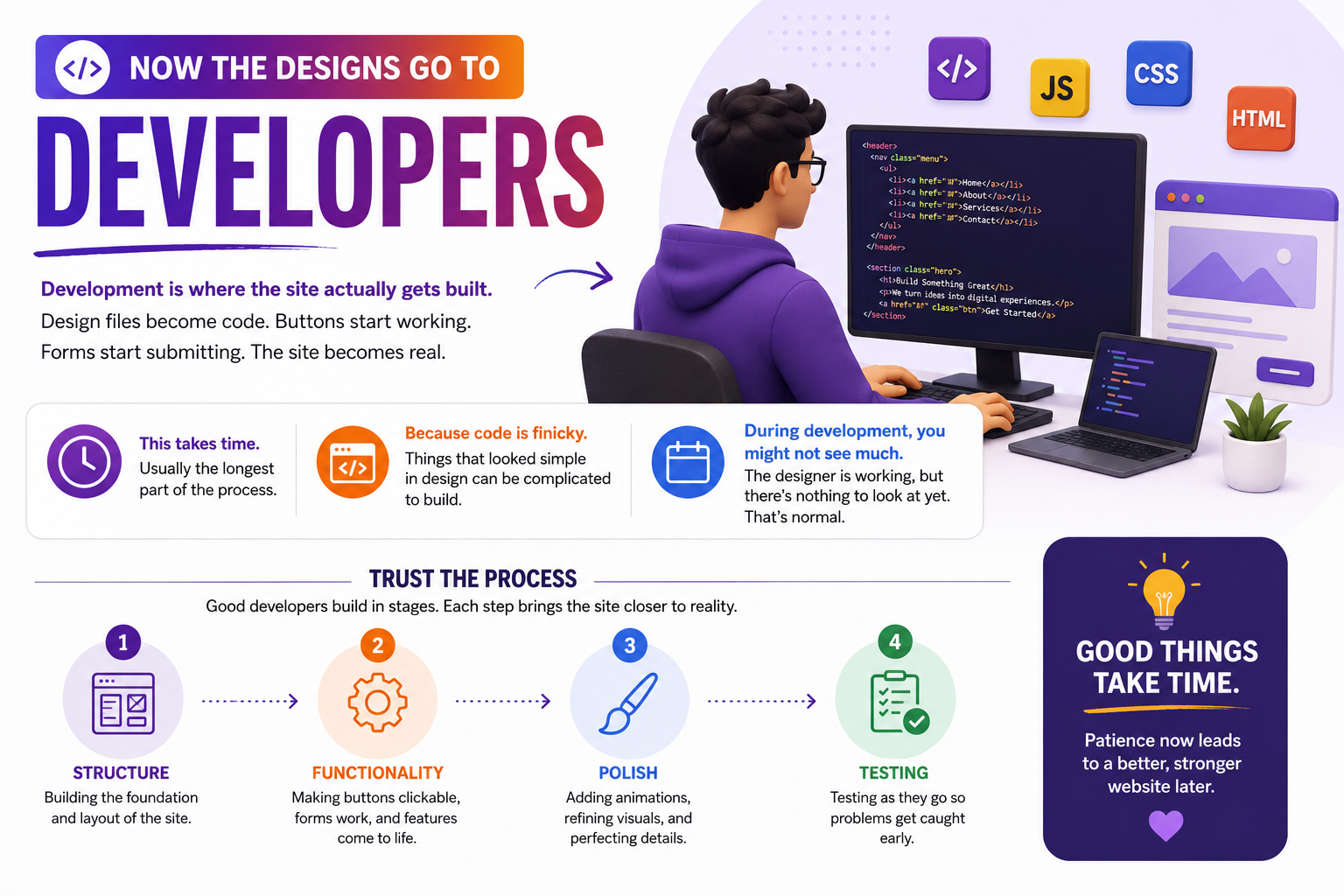
With designs locked, the files move into the hands of developers. Development is where the static design becomes a working website, with buttons that actually click and forms that actually submit. This stage typically takes the longest, since code can turn out far more complicated than the original design suggested.
During development you might not see much visible progress, and that gap can feel unsettling if you do not know what to expect it. Good developers build in stages, starting with structure, then functionality, then polish, testing along the way so that problems surface early rather than all at once near the deadline.
STAGE 7: CONTENT POPULATION
While development continues quietly in the background, someone still needs to place all of your actual content into the site, and this task is almost always more involved than people expect going in. Every page needs full paragraphs, not just headlines, along with calls to action, button labels, and properly captioned images.
Sometimes the designer handles this as part of the package, and sometimes it falls to you, or the work gets split between both parties. The key is agreeing on this division clearly upfront, since nothing stalls a timeline faster than both sides assuming the other person is handling the content.
Content almost always takes longer than expected. A single page might need ten images, five paragraphs, a contact form, and a clear call to action button, and once you multiply that across ten pages, the hours add up quickly. Starting early, well before it feels urgent, keeps content from becoming the bottleneck it tends to be on most projects.
STAGE 8: TESTING
Before anything goes live, the site needs to be tested thoroughly across every device and browser you can reasonably expect visitors to use. Testing means checking every link, every button, and every form on phones, tablets, and computers, across Chrome, Safari, Firefox, and Edge.
Do all the forms send email to the correct inbox? Do all the links lead where they should, and do all the images load properly? Thorough testing catches these problems before customers ever encounter them, which matters far more than it might seem in the moment.
Speed also gets checked at this stage, since both search engines and real visitors penalize slow loading pages. You should stay involved here too, clicking through everything and trying to break things on purpose, since catching an issue now is always easier than catching it after launch.
STAGE 9: LAUNCH
Launch day finally arrives after weeks of planning, designing, building, and testing, and your site moves from a private development server to the open internet where anyone can find it. The best launches tend to be almost boring, since proper testing beforehand means flipping the switch produces no drama and no surprises.
Even with strong preparation, a few small things can still shift during launch. DNS changes take time to spread, caches need clearing, and occasionally a form or plugin behaves slightly differently once it reaches the live server compared to how it behaved during testing. A reliable designer does not disappear the moment the site goes live. They stay close, monitor closely, and fix anything that surfaces immediately rather than waiting until the following week.
STAGE 10: POST-LAUNCH
The site is live, and that milestone genuinely deserves celebration, but websites are never really finished in the way a finished product usually is. The real work begins once visitors start arriving and using the site in ways you did not fully anticipate.
Analytics has become important here, since they reveal which pages attract the most traffic and which ones cause visitors to leave quickly. Sometimes the data tells a surprising story, where a page you assumed was perfectly clear turns out to confuse people, or a button you expected visitors to click gets ignored entirely.
A good designer schedules a proper post-launch review with you, walking through analytics together and helping you understand what is working and what still needs adjustment. From there, the site keeps evolving with new content, updated photos, and the occasional redesign a few years down the line, which is exactly how a healthy website is supposed to grow.
COMMON QUESTIONS CLIENTS ASK ABOUT WEBSITE DEVELOPMENT STAGES
These are the questions that come up most often once people start grasping how website development stages actually connect to one another.
HOW LONG DOES THE ENTIRE PROCESS TAKE?
A basic site with five to ten pages can often be completed in six to eight weeks, while a medium sized business site with custom pages and additional features usually takes closer to three or four months.
HOW MUCH CONTROL DO I ACTUALLY HAVE ALONG THE WAY?
You shape the structure during wireframing and refine the appearance during Design mockups, which are your two biggest opportunities for input. Changes become more expensive once development begins, since rewriting working code takes real time.
WHAT HAPPENS IF I DO NOT LIKE SOMETHING?
Speak up early, since changes are far easier and cheaper to make before a page is fully built. Specific feedback like “the headline font feels too formal for our brand” is far more useful than a vague “I do not like this.”
CAN I SEE ONGOING PROGRESS ON MY SITE?
Most designers share wireframes, design concepts, and development milestones as the project moves forward, though you should not expect daily updates. Designers need uninterrupted focus time to actually finish the work.
WHAT HAPPENS IF MY CONTENT ARRIVES LATE?
The project stalls, since designers cannot finalize pages without the text and images meant to fill them. Deadlines slide, and some designers may apply fees for significant delays, which is why gathering content early matters so much.
WHO OWNS THE FINISHED WEBSITE?
You do once the project has been paid in full, including the content, design, and code. Confirm this clearly in your contract, since some designers retain certain rights or license their work instead of transferring full ownership.
WHAT ABOUT DOMAINS AND HOSTING?
You typically purchase your own domain so that you retain ownership of it permanently. Hosting can be handled by the designer or managed independently, and many designers offer ongoing managed hosting for an additional fee.
CAN I UPDATE THE WEBSITE MYSELF AFTER LAUNCH?
Most modern sites run on a content management system that lets you update text, swap images, and add new pages without technical help. More complex changes may still require a designer's involvement.
WHAT KIND OF SUPPORT COMES AFTER LAUNCH?
A reasonable post launch support window, often around thirty days, is standard among quality designers, during which they fix anything that breaks or needs adjustment. After that window closes, you can typically engage them again for upgrades or ongoing maintenance.
HOW SHOULD WE COMMUNICATE THROUGHOUT THE PROJECT?
This depends on what works for both sides, whether that means weekly calls, regular email updates, or a shared project management tool. Agreeing on these upfront keeps expectations clear for everyone involved.
WEB DESIGN PROCESS EXPLAINED: THE RED FLAGS YOU SHOULD KNOW
Now that you understand how websites are built, it helps to know which warning signs suggest a designer is cutting corners.
- No discovery questions at all, which usually means they are designing without understanding your business first.
- Skipping wireframes entirely and jumping straight to visual design, which often means structure gets ignored.
- No mobile version is shown during the design phase, which is simply unacceptable at this point.
- Vague timelines, where “it will be done when it is done” passes for an actual answer.
- No mention of testing, which usually means none is happening behind the scenes.
- Never seeing any work until it is presented as finished, which is exactly how expensive surprises happen.
HOW TO KNOW YOUR WEB DESIGN WORKFLOW IS RELIABLE
The strongest web design workflow tends to share a few common traits, regardless of which agency or freelancer is running it, and recognizing these traits can save you from countless headaches and wasted resources.
Clear communication stands at the very top of this list because you should always know exactly what is happening next and why, without having to chase down answers or piece together information from scattered emails. A reliable workflow includes regular check-ins that are not necessarily daily but frequent enough that you never feel forgotten or left wondering about the status of your project.
Genuine room for feedback at multiple points throughout the project is essential, not just one rushed review at the end when changes are expensive and difficult to implement, because your input should shape the work from beginning to end.
Flexibility is another hallmark of a dependable workflow because unexpected issues inevitably arise in any complex project, and good processes adapt rather than break under pressure, finding creative solutions instead of making excuses.
Transparency around timelines, costs, and expectations must be established from the very first conversation, with no hidden fees or vague promises that leave you guessing about what you are actually paying for. A reliable workflow also demonstrates respect for your time and your business goals, treating your project with the seriousness it deserves rather than as just another item on a long to-do list.
When you find a designer or agency that checks all these boxes, you can move forward with confidence knowing that your web design project is in capable hands and that the final result will reflect your vision accurately.
LET US GUIDE YOU THROUGH EVERY STEP
A reliable web design process explained clearly looks something like this: discovery to understand your business, wireframing to plan structure, Design mockups to make it beautiful, Stakeholder review to secure sign-off, development to build it, testing to confirm it works, launch to bring it live, and post-launch to keep improving from there.
Each stage exists for a reason, and each one protects you from a problem that would be far more expensive to fix later. When you understand the process, you stop being a passive bystander and become an active part of the team, knowing exactly when to speak up, when to wait, and when to trust the work happening behind the scenes.
At The Designers Agency, we do more than build websites. We walk you through every stage with no unnecessary jargon and no mystery, just clear communication and careful work at every step. Let us build something exceptional together, shaped entirely around your vision and your goals.

Unlocking Digital Prowess through Innovative Solutions and Unparalleled Customer Service.